One sphere.
All your passwords.
Zero cloud.
Passphere keeps your passwords encrypted locally, synced peer-to-peer across all your devices. No account. No cloud. No subscription. Entirely yours.
No sign-up. No credit card. No cloud.
Up and running in minutes.
No account. No setup wizard. No cloud configuration.
Create a vault
Give your vault a name and set a master password. Your vault is encrypted instantly and stored only on your device — nothing leaves.
Add your passwords
Store logins, URLs, and notes. Use the built-in password generator to create strong credentials, with real-time strength feedback.
Sync across devices
Scan a QR code to sync your vault peer-to-peer to any other device — iPhone, Android, desktop. No account. No cloud. No middleman.
Available everywhere.
One app, every platform. Your vaults sync across all of them.
All platforms share the same vaults. Sync between any of them — no account needed.
Everything you need. Nothing you don't.
Built for people who take privacy seriously.
End-to-End Encryption
AES-GCM encryption with PBKDF2 key derivation (100,000 iterations). Your master password never leaves your device. Zero-knowledge by design.
Fully Offline
All your passwords are stored locally on your device. No internet connection required after install. No cloud sync means no remote breach risk.
Cross-Device Sync
Sync vaults between devices with peer-to-peer technology — scan a QR code for quick sync, or use offline mode for air-gapped transfers. No server middleman.
Password Generator
Generate strong, secure 16-character passwords instantly. Built-in entropy-based strength indicator gives real-time feedback as you type or generate.
Multiple Vaults
Organize passwords into separate encrypted vaults — work, personal, shared. Each vault has its own master password and auto-locks after inactivity.
Import & Export
Migrate from any password manager. Import CSV or JSON files with automatic field detection. Export to encrypted .vault files or unencrypted CSV/JSON.
Why no cloud?
Because the cloud is just someone else's computer — and you shouldn't trust strangers with your passwords.
- Your passwords live on a company's server
- One breach can expose millions of users at once
- You have to trust a corporation with your most sensitive data
- Monthly fees fund the infrastructure holding your data hostage
- If the company shuts down, your passwords go with it
- You're the product — your data funds their business model
- Your passwords live on your device — and only your device
- A breach somewhere else is irrelevant to your vault
- Zero-knowledge design means even we can't read your data
- Pay once, own forever — no subscription, no recurring fees
- Export your vault anytime — you're never locked in
- You're the owner — your data is yours, full stop
Security you can verify.
No trust required — just math.
256-bit Encryption
All vault data is encrypted using AES-GCM, the same standard used by banks, governments, and security agencies worldwide. Authenticated encryption means tampering is detected.
Key Derivation
Your master password is never stored. It's transformed into an encryption key using PBKDF2 with 100,000 iterations and a unique random salt per vault — making brute-force attacks computationally infeasible.
Native Cryptography
All cryptographic operations use your device's built-in Web Crypto API — a sandboxed, hardware-accelerated implementation. No third-party crypto libraries means no supply chain risk.
No One Else Can Read It
Passphere has zero knowledge of your vault contents. There are no backdoors, no master recovery keys, and no server that holds your data. If you lose your master password, no one can help — by design.
Inactivity Protection
Vaults automatically lock after a configurable period of inactivity. When locked, the decryption key is wiped from memory — your data is protected even if someone picks up your unlocked device.
Nothing Phones Home
Passphere contains no analytics SDKs, no crash reporters, no usage trackers. The app never initiates a network connection unless you explicitly trigger a sync or open the web app for the first time.
See it in action.
Clean, focused, and fast — on every platform.
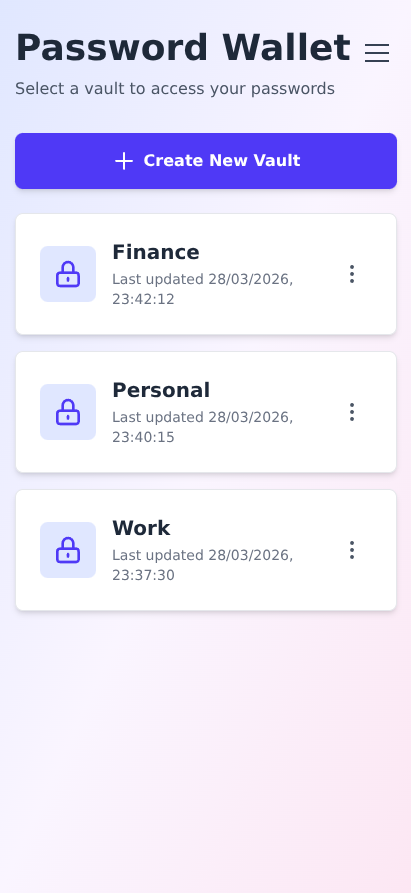
All your vaults at a glance
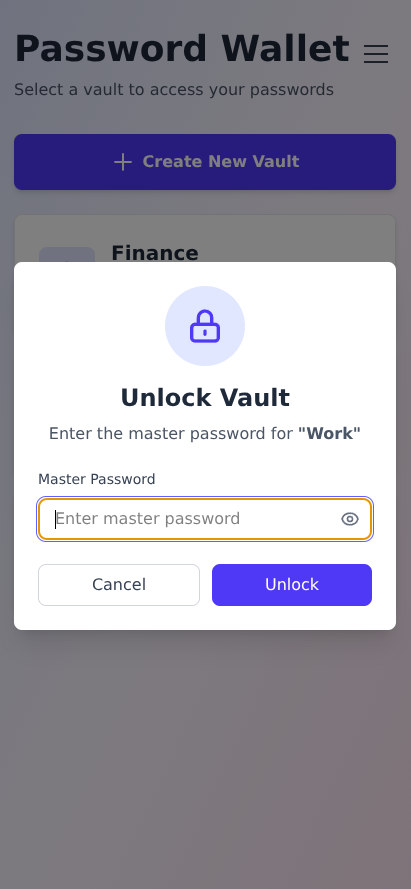
Secured by your master password
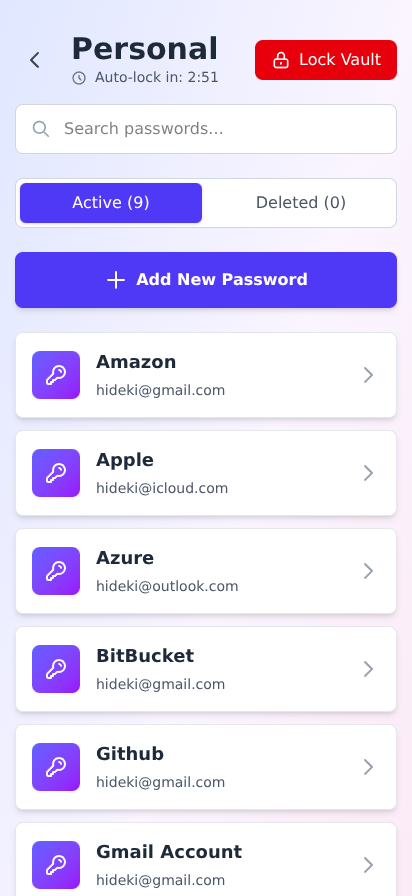
All passwords, instantly searchable
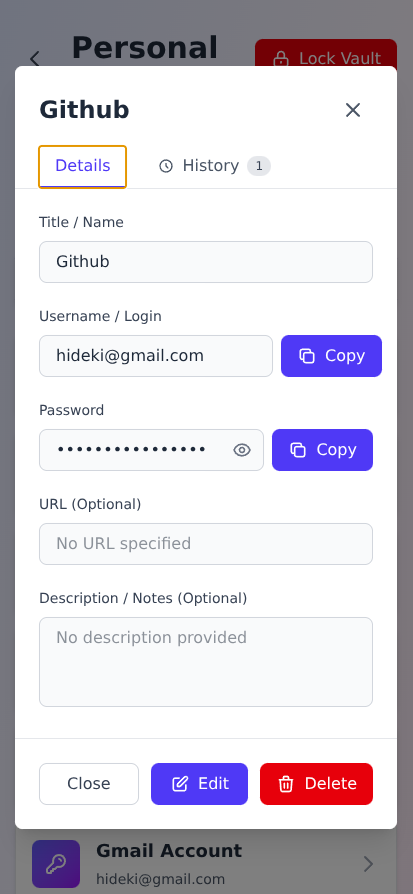
View and copy with one tap
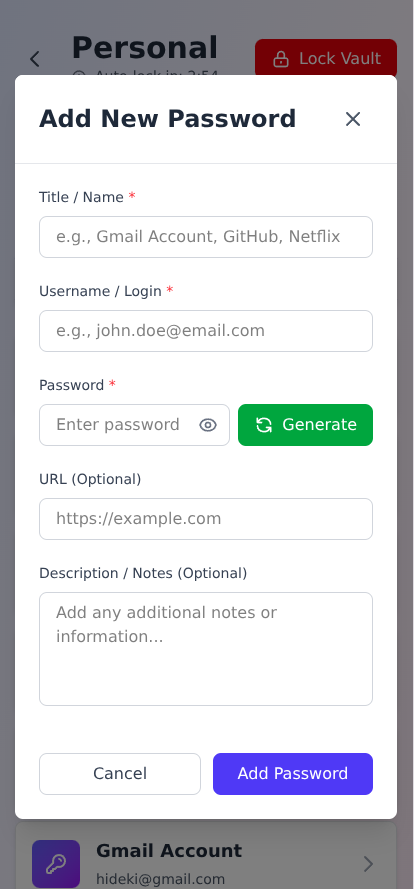
Add passwords in seconds
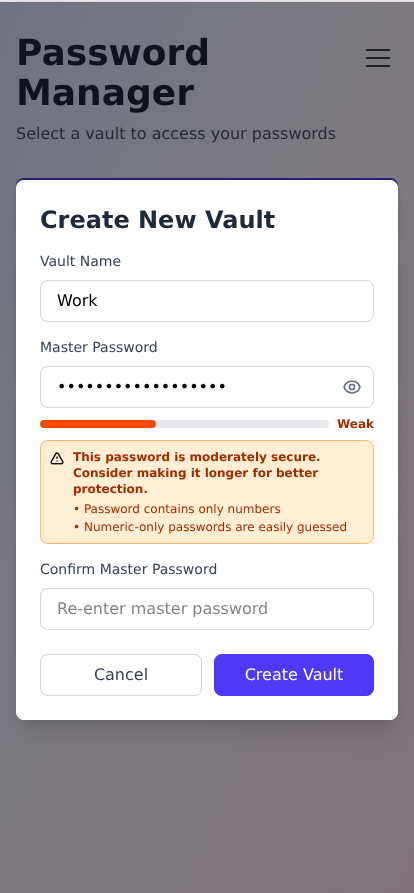
Create encrypted vaults instantly
Simple, honest pricing.
One-time purchase. No subscriptions. No data harvesting.
Install the web app on any device — desktop or mobile — directly from your browser.
- All core features included
- Works in any modern browser
- Install to home screen (iOS & Android)
- Works fully offline after install
- Free updates, always
Native mobile apps for the best on-device experience, with system-level integration.
- Everything in the Web App
- Native iOS & Android experience
- Available on App Store & Google Play
- One-time payment, no subscription
- Seamless sync with web app
- Vault data backed up automatically via iCloud (iOS) or Google Backup (Android)
Backups are encrypted end-to-end by the OS — your vault data remains unreadable even inside your cloud backup.
Frequently asked questions.
Still have questions? Everything you need to know.
No. All your password data is stored exclusively on your device. Nothing is ever sent to any server. There is no account to create, no email address required, and no remote database holding your data. Your passwords never leave your device unless you explicitly export or sync them yourself.
Passphere uses AES-GCM (Advanced Encryption Standard in Galois/Counter Mode) for encrypting vault data, and PBKDF2 with 100,000 iterations and a random salt for deriving encryption keys from your master password. All cryptographic operations are performed natively by your device's Web Crypto API — no third-party crypto libraries.
Because Passphere uses zero-knowledge encryption, there is no way to recover a forgotten master password — not even we can help. This is by design: it means nobody else can access your vault either. We strongly recommend exporting an encrypted backup of your vault regularly and storing it somewhere safe so you can restore from it if needed.
Passphere offers two sync modes: Quick Sync uses a peer-to-peer connection (via PeerJS) — one device generates a QR code, the other scans it, and vaults sync directly between devices with no server involved. Offline Sync works without any internet connection at all — you manually copy-paste encrypted connection data between devices, even on an air-gapped network.
The Web App (PWA) is completely free and works in any modern browser. You can install it to your home screen on iOS or Android for an app-like experience. The iOS and Android apps ($25 one-time per platform) are native applications available through the App Store and Google Play. They offer deeper system integration, a more polished native UI, and all the same features. All versions are compatible and can sync with each other.